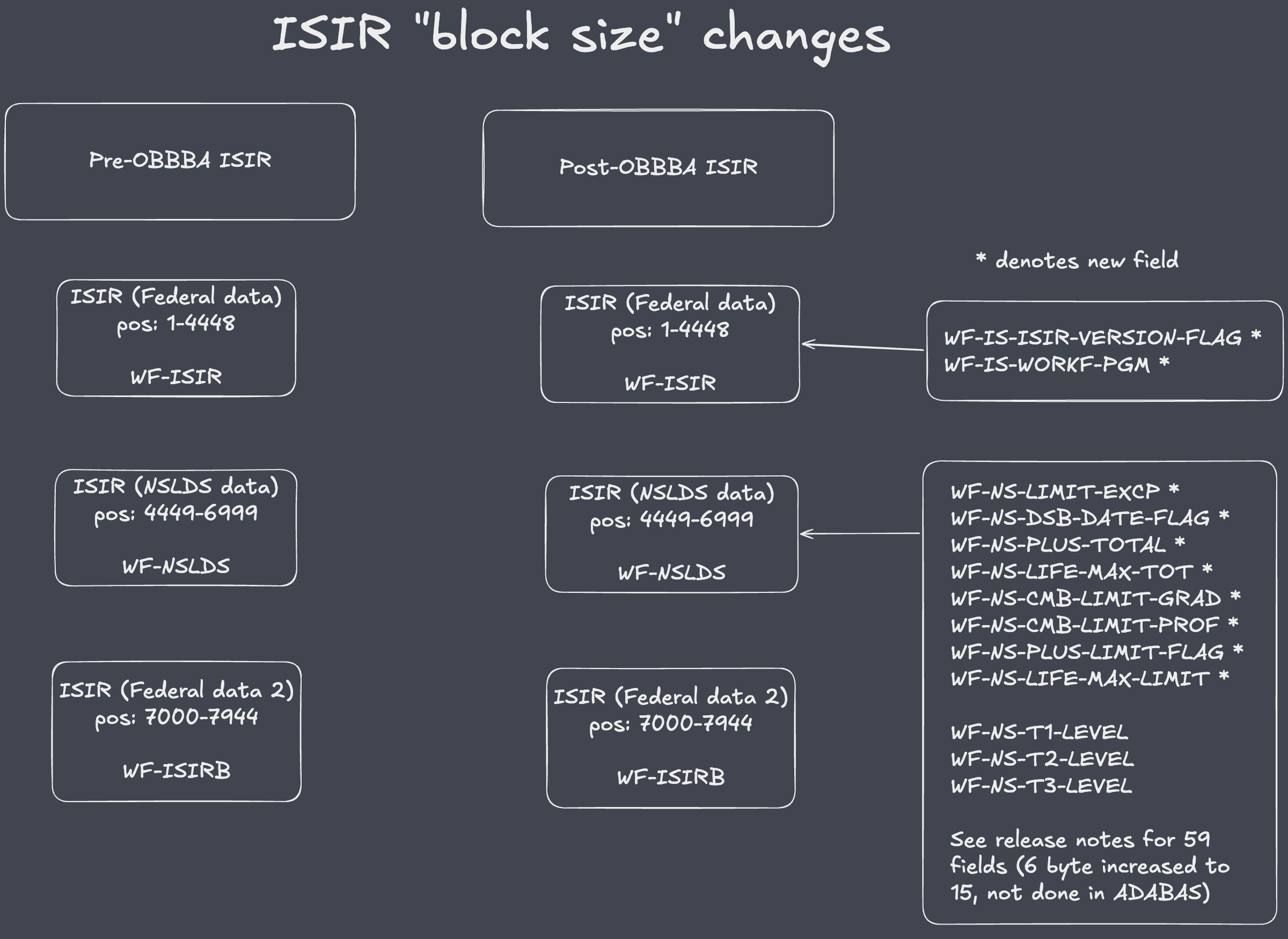
This release is required to support updates to various fields that have been added or modified as part of the ISIR changes announced under the OBBBA modifications.
Additional materials from the Department of Education (DoE) materials and/or WolffPack (WP) generated materials can be found on the 2026–27 FAFSA Specifications Guide (April 2026 Update) page.
File change notes:
Incoming ISIR record layout
The ISIR record layout has been updated for all ISIRs delivered on or after April 26, 2026.
Although the overall ISIR record length (7,944 bytes) remains unchanged, the format has been modified to introduce new fields and expand the length of certain existing fields. The ISIR layout can be found (in .xslx format) at the DoE link for Volume 4 of the Specifications Guide. Previously delivered ISIR records will not be reissued in the new format; however, all new ISIRs (whether generated automatically or through corrections) will conform to the updated layout.
As an alternative resource, WolffPack has created its own Google Sheet which cross-references the ISIR layout and various FINANCIER files/layouts. The Google Sheet: New Draft 2026-2027 ISIR (March 2026 ISIR tab) lists the ISIR layout, while the (Cross reference tab) details ISIR field names (as defined on the WF27FEDL file) vs FINANCIER "file" field names. Finally, the (All changed fields tab) details fields changed since the original release of the 2026-2027 Regs.
COD driven changes
Due to the upcoming COD Schema release, and in an effort to keep all database changes together, the CPS file for the 2026-2027 year needs to be modified to support a two byte Year in College field, because, well why not?
Functional change notes:
Note: While a limited number of new fields have been introduced within the core ISIR data, the majority of the changes are contained within the NSLDS segment. The FINANCIER updates support the addition of new fields and the resizing of certain existing fields; however, they do not include support for expanding previously defined amount fields from 6 bytes to 15 bytes.
This approach was taken due to the significant development effort required to fully accommodate the expanded field sizes. Because existing data values are not expected to approach the maximum capacity of the current 6 byte fields, FINANCIER has instead been enhanced to identify and report any values exceeding 999,999, while capping those values at 999,999 during processing.
It is anticipated that few, if any, student records will contain values that exceed this threshold.
New fields and length changes are detailed below:
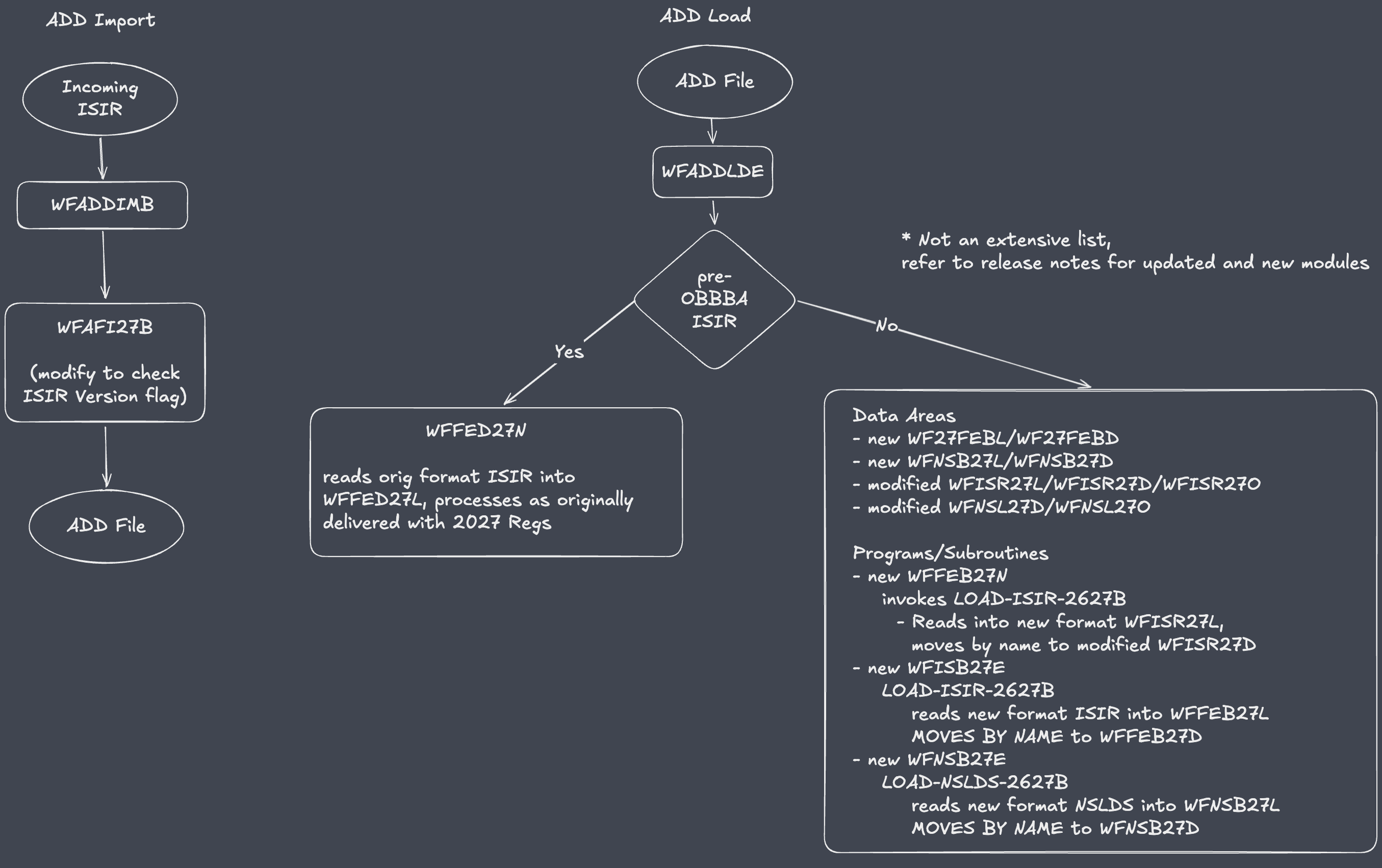
FINANCIER has been enhanced to evaluate the newly delivered field, WF-IS-ISIR-VERSION-FLAG (previously designated as FILLER). When this flag indicates that the ISIR is in the new format (WF-IS-ISIR-VERSION-FLAG=1), the ADD Import process will set a corresponding indicator within the WF-ADD-FILE record. This enhancement ensures that the ISIR is routed through the updated data-loading routines within the ADD Load process.
During execution, the ADD Load process will invoke newly delivered routines specifically designed to process the revised ISIR layout for records identified as the new format. Previously delivered ISIRs, which do not have the WF-IS-ISIR-VERSION-FLAG field set, will continue to be processed through the version of the Load process originally delivered in the 2026–2027 Regulatory release.
One new field, NSLDS Loan Limit Exception Flag - WF-NS-LIMIT-EXCP, will be displayed on the NSLDS screen in FINANCIER.
The Postscreening Reason Code fields - WF-IS-C-NSLDS-PS1, WF-IS-C-NSLDS-PS2, WF-IS-C-NSLDS-PS3 - had values 28-39 added.
FINANCIER File changes:
Updated Files:
To implement the release, complete the following steps:
         GR 2 WF-CPS-RPT-TEACH1-FAO                                    CK
            3 WF-CP-RT1-R-GRANT                N        1.0            CL N
            3 WF-CP-RT1-R-FED-TRAN             A        2.0            CM N
chg->       3 WF-CP-RT1-R-YR-COL               A        2.0            CN N
            3 WF-CP-RT1-R-ENR-DATE             D                       CO N
            3 WF-CP-RT1-R-AWARD                P        5.2            CP N
            3 WF-CP-RT1-R-DISB                 P        5.2            CQ N
         GR 2 WF-CPS-RPT-TEACH1-COD                                    CR
            3 WF-CP-RT1-A-GRANT                N        1.0            CS N
            3 WF-CP-RT1-A-FED-TRAN             A        2.0            CT N
chg->       3 WF-CP-RT1-A-YR-COL               A        2.0            CU N
            3 WF-CP-RT1-A-ENR-DATE             D                       CV N
            3 WF-CP-RT1-A-AWARD                P        5.2            CW N
            3 WF-CP-RT1-A-DISB                 P        5.2            CX N

         GR 2 WF-CPS-RPT-TEACH2-FAO                                    DN
            3 WF-CP-RT2-R-GRANT                N        1.0            DO N
            3 WF-CP-RT2-R-FED-TRAN             A        2.0            DP N
chg->       3 WF-CP-RT2-R-YR-COL               A        2.0            DQ N
            3 WF-CP-RT2-R-ENR-DATE             D                       DR N
            3 WF-CP-RT2-R-AWARD                P        5.2            DS N
            3 WF-CP-RT2-R-DISB                 P        5.2            DT N
         GR 2 WF-CPS-RPT-TEACH2-COD                                    DU
            3 WF-CP-RT2-A-GRANT                N        1.0            DV N
            3 WF-CP-RT2-A-FED-TRAN             A        2.0            DW N
chg->       3 WF-CP-RT2-A-YR-COL               A        2.0            DX N
            3 WF-CP-RT2-A-ENR-DATE             D                       DY N
            3 WF-CP-RT2-A-AWARD                P        5.2            DZ N
            3 WF-CP-RT2-A-DISB                 P        5.2            EA N
            2 WF-IS-FILLER13                   A       39.0            D5 N
add->    GR 1 WF-ISIR2                                                 D9
add->       2 WF-IS-ISIR-VERSION-FLAG          A        1.0            D7 N
add->       2 WF-IS-WORKF-PGM                  A        1.0            D8 N
         SP 1 WF-ISIR-KEY                      A       11.0        D   D6
            2 WF-NS-T1-SEQ                     A        2.0            DZ N
            2 WF-NS-T1-SCHOOL                  A        8.0            EA N
            2 WF-NS-T1-TRAN                    A        2.0            EB N
            2 WF-NS-T1-DATE                    A        8.0            EC N
            2 WF-NS-T1-SCH-AWD                 A        6.0            ED N
            2 WF-NS-T1-PAID                    A        6.0            EE N
            2 WF-NS-T1-AWARD                   A        6.0            EF N
chg->       2 WF-NS-T1-LEVEL                   A        3.0            EG N
            2 WF-NS-T1-AWDYEAR                 A        4.0            EH N
            2 WF-NS-T1-CONV                    A        1.0            EI N
            2 WF-NS-T1-DCHG                    A        4.0            EJ N

            2 WF-NS-T2-SEQ                     A        2.0            EN N
            2 WF-NS-T2-SCHOOL                  A        8.0            EO N
            2 WF-NS-T2-TRAN                    A        2.0            EP N
            2 WF-NS-T2-DATE                    A        8.0            EQ N
            2 WF-NS-T2-SCH-AWD                 A        6.0            ER N
            2 WF-NS-T2-PAID                    A        6.0            ES N
            2 WF-NS-T2-AWARD                   A        6.0            ET N
chg->       2 WF-NS-T2-LEVEL                   A        3.0            EU N
            2 WF-NS-T2-AWDYEAR                 A        4.0            EV N
            2 WF-NS-T2-CONV                    A        1.0            EW N
            2 WF-NS-T2-DCHG                    A        4.0            EX N

            2 WF-NS-T3-SEQ                     A        2.0            FB N
            2 WF-NS-T3-SCHOOL                  A        8.0            FC N
            2 WF-NS-T3-TRAN                    A        2.0            FD N
            2 WF-NS-T3-DATE                    A        8.0            FE N
            2 WF-NS-T3-SCH-AWD                 A        6.0            FF N
            2 WF-NS-T3-PAID                    A        6.0            FG N
            2 WF-NS-T3-AWARD                   A        6.0            FH N
chg->       2 WF-NS-T3-LEVEL                   A        3.0            FI N
            2 WF-NS-T3-AWDYEAR                 A        4.0            FJ N
            2 WF-NS-T3-CONV                    A        1.0            FK N
            2 WF-NS-T3-DCHG                    A        4.0            FL N
            2 WW-FILLER13                      A       20.0            KW N
add->    GR 1 WF-NSLDS2                                                LG
add->       2 WF-NS-LIMIT-EXCP                 A        1.0            KY N
add->       2 WF-NS-DSB-DATE-FLAG              A        1.0            KZ N
add->       2 WF-NS-PLUS-TOTAL                 A       15.0            LA N
add->       2 WF-NS-LIFE-MAX-TOT               A       15.0            LB N
add->       2 WF-NS-CMB-LIMIT-GRAD             A        1.0            LC N
add->       2 WF-NS-CMB-LIMIT-PROF             A        1.0            LD N
add->       2 WF-NS-PLUS-LIMIT-FLAG            A        1.0            LE N
add->       2 WF-NS-LIFE-MAX-LIMIT             A        1.0            LF N
         SP 1 WF-NSLDS-KEY                     A       11.0        D   KX